Icon of program: AllerCalc

AllerCalc for Windows

  • Free
  • 3.8
    22
  • 32.6K
  • V2.11
Free Download for Windows

View an ad to download for free

Excellent calculator with multiple options

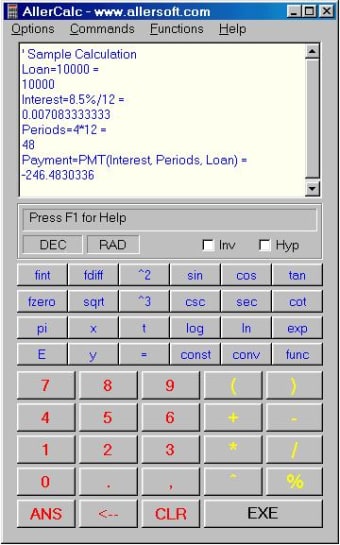
AllerCalc, previously know as VersaCalc, is an advanced calculator which allows you to perform complex scientific calculations that other calculators can't handle.

Top Recommended Alternative

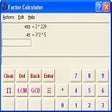
The calculator works with a rotating screen that stores your last calculations and results. It supports more than forty functions including algebraic, transcendental, trigonometrical, hyperbolic and financial. Chances are that if you can't solve a mathematical equation with this calculator, then you won't be able to solve it with anything.

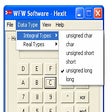
AllerCalc also includes different options that allow you to choose the sources, format (general or scientific) and select the number of decimals to visualize. You can even make metric conversions and much much more. A powerful calculator for that need some serious mathematical power.

  • Pros

    • Very powerful
    • Possible to calculate complex equations
    • Calculates in metric and imperial measurements
  • Cons

    • Doesn't have any instructional information
 0/1

App specs

  • Developer

    • Allersoft
  • License

    Free

  • Version

    2.11

  • Latest update

  • Platform

    Windows

  • OS

    Windows 95

  • Language

    English

  • Downloads

    32.6K

    Last month's downloads

    • 16
  • Size

    460.72 KB

Program available in other languages


Icon of program: AllerCalc

AllerCalc for PC

  • Free
  • 3.8
    22
  • 32.6K
  • V2.11
Free Download for PC

View an ad to download for free


User reviews about AllerCalc

3.8

2 reviews

Add review

Main reviews for you

  • Anonymous user

    The best calculator ever for frequent usual mathematics. If you keep you handheld scientific calculator near by you you can't find better. you can hide the keyboard and keep only your calculation historic and modify at will your past calculations and get the new result. you type your calculation line with the functions you need "excel wise" and hit "enter" you get your result. if after lunch you just forget where you put your note with what it give. just open Allercacl and you get everything you did unless you clear your screen even after reboot. Once I new I made the calculation the week before and couldn't remember what were the number... guess what I rolled back got my calculations change few numbers by new one and got my new result without the head-hack!!! THE BEST!!! I'm engineer and be using it since more than 10 years now.And I forgot... no need to install it, just double clic and here you go...there is also unit converters and hex and other thing but as windows 10 do not allow anymore to read help files it's a bit harder to begin using it since you need to know the specific name of the function and therefore idle a while before finding the right ones...if someone could get the code and update this wonder i would pay for it!!! double rate!!! for the time it saved me over my life.

  • Anonymous user

    Uninstalled it after just a few minutes. 1) no easy way to flip between decimal and hex. you have to drop down the options list and click to get to another drop down to chose Decimal, Hex, binary, octal etc. Should at least be a pf key to flip between dec and hex (as MS's calc does). After all this is a hex calc!2) no key to clear display. ESC minimizes it. once again drop down menu and click Clear Display (CLR).3) conversion of a negative decimal number into hex gave different results with each try. None were correct.4) starts up with a 'finance window'. Drop down option to show it or not does nothing. you have to X close it to get rid of it.5) Download blew away IE. Looked up and it was gone. Restarted and it said it closed unexpectedly etc.6) Uninstall left AllerCalc dir with files in it and a registry entry too. Pros: NONE Cons: See above. that was only a few minutes

More

You may also like

Alternatives to AllerCalc

Explore Apps

Latest articles

Laws concerning the use of this software vary from country to country. We do not encourage or condone the use of this program if it is in violation of these laws.
Softonic

Is AllerCalc safe?

Score result: Clean

This file passed a comprehensive security scan using VirusTotal technology. It is safe to download.

  • Virus free
  • Spyware free
  • Malware free
  • Verified by Security Partners

    VirusTotal logo

Scan Info

Last scan
Wednesday, December 2, 2020
Scan provider
VirusTotal

Softonic security commitment

AllerCalc has been thoroughly scanned by our advanced security systems and verified by industry-leading partners. This file comes from the official developer and has passed all our security checks, showing no signs of viruses, malware, or spyware. For more information, visit our Security and Trust Center

Signed in to Softonic as